
MBO Datasets#
This guide describes data acquired at the Miller Brain Observatory using ScanImage and light-sheet microscopy systems.
Acquisition Types#
The MBO supports several imaging modalities, each with distinct data organization:
Acquisition Type |
Dimensions |
Z-Strategy |
Frame Averaging |
|---|---|---|---|
TZYX |
Interleaved z-planes as channels |
No |
|
TZYX |
Sequential z-slices via piezo |
Optional |
|
TYX or YX |
Single plane or projection |
Optional |
|
TZYX |
Simultaneous multi-view |
No |
Array Terminology#
All MBO datasets are stored as multi-dimensional arrays with consistent dimension ordering:
Dimension |
Description |
|---|---|
[Y, X] |
Single 2D plane |
[Z, Y, X] |
Single volume (z-stack) |
[T, Y, X] |
2D timeseries |
[T, Z, Y, X] |
Volumetric timeseries |
Frame Definition
A frame represents a single 2D raster scan of the field of view, saved as one TIFF page with shape (height, width).
ScanImage Hierarchy#
For ScanImage acquisitions, data is organized hierarchically:
Term |
Definition |
|---|---|
Frame |
One 2D scan (one TIFF page) |
Slice |
One z-position (may contain multiple frames if |
Volume |
One complete z-stack (all slices) |
Timepoint |
One volume acquisition in a time series |
Optimized LBM#
Data acquired on the optimized or high-res light-beads microscopy (LBM) modules.
Example Dataset
Example dataset collected by Kevin Barber with Dr. Alipasha Vaziri @ Rockefeller University.
Field |
Value |
|---|---|
Animal |
mk301 |
Date |
2025-03-01 |
Virus |
jGCaMP8s |
Framerate |
17 Hz |
FOV |
900 um x 900 um |
Resolution |
2 um x 2 um x 16 um |
Raw Data#
ScanImage Multi Region Of Interest (mROI) outputs raw .tiff files made up of individual Regions of Interest (ROI's).
In its raw form, data is saved as a 3-dimensional multi-page tiff file with each ROI stacked vertically relative to the fast-galvo scan direction.
The location of each ROI is stored as a pixel coordinate used internally by the respective pipeline to orient each strip.
Frame Ordering#
LBM saves z-planes interleaved as channels. There is no frame averaging because the piezo is not used.
ScanImage saves raw tiffs with each z-depth and timepoint interleaved [zT]:
frame0 = time0_plane1
frame1 = time0_plane2
frame2 = time0_plane3
frame3 = time1_plane1
frame4 = time1_plane2
Data organized this way is generally incompatible with downstream processing libraries like suite2p, CaImAn and EXTRACT.
For compatibility, we reorganize (de-interleave) the frames as follows:
frame0 = time0_plane1
frame1 = time1_plane1
frame2 = time2_plane1
frame3 = time0_plane2
frame4 = time1_plane2
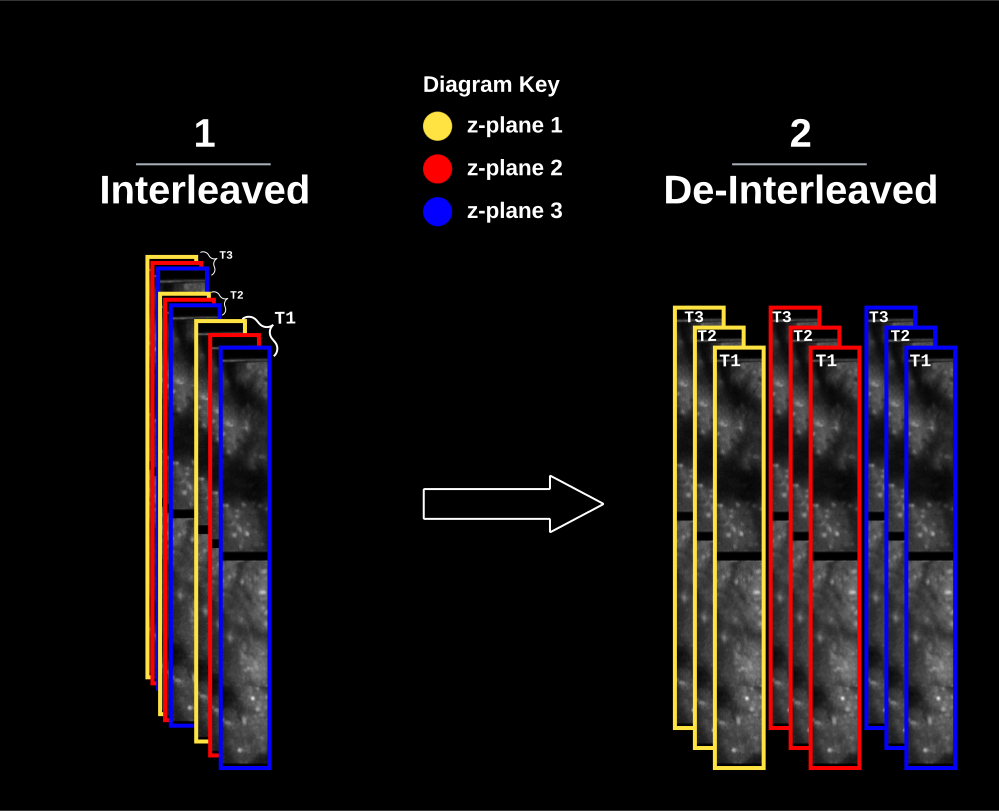
Raw data are stored first by z-plane, for each timepoint (1) before being deinterleaved (2). This example shows a session with 2 ROI’s shown vertically stacked with a black bar of ~14 pixels in between.#
Splitting Frames Across Files
Before beginning the recording session, users have the option to split frames in the recording across multiple .tiff files. This option is helpful as it requires less work in post-processing to ensure there isn’t too much computer memory being used.
Piezo Stack#
Piezo acquisitions use a piezo actuator to sequentially move through z-positions, creating volumetric data.
Frame Organization#
Unlike LBM where z-planes are interleaved, piezo stacks acquire all frames at one z-position before moving to the next slice:
slice0_frame0 -> slice0_frame1 -> ... -> slice0_frameN ->
slice1_frame0 -> slice1_frame1 -> ... -> slice1_frameN ->
...
sliceZ_frame0 -> sliceZ_frame1 -> ... -> sliceZ_frameN
Key Metadata#
Parameter |
Description |
|---|---|
|
Number of z-positions in the stack |
|
Number of frames acquired at each z-position |
|
If > 1, frames are averaged during acquisition |
Frame Averaging#
When si.hStackManager.framesPerSlice > 1 and si.hStackManager.logAverageFactor == 1:
Multiple frames exist per z-slice in the raw data
These can optionally be averaged together during preprocessing
Averaging improves SNR at the cost of temporal resolution
When to Average
Frame averaging is useful for structural imaging or when temporal resolution is less critical. For fast calcium dynamics, consider keeping individual frames or using fewer framesPerSlice.
Standard 2P#
Non-LBM, non-piezo acquisitions for simpler imaging scenarios.
Data Formats#
Type |
Dimensions |
Use Case |
|---|---|---|
2D Time Series |
TYX |
Single-plane functional imaging |
2D Projection |
YX |
Structural imaging, max projections |
Data Format#
Standard acquisitions are straightforward:
Each frame is a single 2D scan
Frames are stored sequentially in time order
No de-interleaving required
IsoView Light-Sheet#
IsoView is a multi-view light-sheet microscopy system for high-speed volumetric imaging.
Coming Soon
Detailed documentation for IsoView data organization is in development. Contact the MBO team for current protocols.
ScanImage Metadata#
The primary distinction between MBO datasets is how data is organized on disk. This information is stored in the ScanImage Metadata.
Overview#
ScanImage stores metadata about image size, frame rate, resolution, and regions of interest within the raw .tiff file.
Each pipeline handles this metadata for you, and provides an interface to use these values throughout the pipeline.
Note: With multi-ROI tiffs, the size of your tiff given by
image_sizewill be different from the number of pixels in x and y. This is due to the time it takes the scanner to move onto subsequent ROI’s not being accounted for innum_pixel_xy. Internally, each pipeline checks for these metadata attributes and adjusts the final image accordingly.
Usage#
Each pipeline comes stocked with methods to retrieve imaging metadata.
Python metadata is can be accessed with mbo_utilities.get_metadata().
objective_resolution: 157.5000
center_xy: [-15.2381 0]
size_xy: [3.8095 38.0952]
num_pixel_xy: [144 1200]
image_length: 2478
image_width: 145
num_planes: 30
num_rois: 4
num_frames: 1730
frame_rate: 9.608
fov: [600 600]
pixel_resolution: 1.0208
sample_format: 'int16'
MATLAB metadata can be retrieved with the get_metadata() utility funciton.
num_planes: 14
num_rois: 2
num_frames: 381
frame_rate: 17.0670
fov: [896 896]
pixel_resolution: 2
sample_format: 'int16'
roi_width_px: 224
roi_height_px: 448
tiff_length: 912
tiff_width: 224
raw_filename: "file.tif"
raw_filepath: "D:\Demo"
raw_fullfile: "D:\Demo\file.tif"
num_lines_between_scanfields: 16
center_xy: [2x1 double]
line_period: 6.3139e-05
scan_frame_period: 0.0586
size_xy: [2x1 double]
objective_resolution: 61